top of page
How can I design assets that work seamlessly across both digital and print formats, while meeting accessibility, interactivity and production requirements?
Digital vs Print

Context
This project explores the challenges of digital vs printed documents and what happens when a single asset needs to work for both. It looks at interactivity, for digital and print ready artwork for a wide range of use cases.
Working at Knauf Insulation, I need to make sure all assets meet brand guidelines, follow print industry standards and
are user friendly for all formats.
Process
To do this, I researched into digital and print formats.
For digital, exploring interactive elements, navigation, legibility and optimising for online viewing. For print,
I worked closely with our print supplier, exploring templates for printed assets, bleeds and crop marks, page count - needing to be in groups of four, image quality and finally checking colour profiles.
For this I:
-
Designed layouts suitable to both print and digital.
-
Explored interactive elements in InDesign
(Design software). -
Prepared assets for print using CYMK colour profiles, bleeds and crops marks, 3mm bleed for standard A4 size document and increased based on design size.
-
Redesigned digital artwork into scalable print
ready artwork. -
Worked closely with print suppliers, checking specifications and correct use of templates supplied.
-
Checking how printed assets would be applied, for example, large graphic panels mounted to the wall on 5mm Foamex boards, brochures trimmed, bound and boxed.
-
Checking image quality for print, is this a high-resolution image or will this be pixelated.
By doing this I could make sure I was consistent in my output and adaptable to both formats.
Challenges
The biggest challenge I faced was balancing digital interactivity with print restrictions. This meant a lot of editing and removing of interactive elements to ensure this can be print ready. For example, links out "click to see our webpage here" had to be adapted to full URLs with instructions on accessing this.
Another challenge was preparing files for print and having the knowledge and understanding of how this needs to be set up for print with bleeds, crops, final output and meeting the print productions templates. Through training with the senior graphic designer and working closely with the print supplier, I was able to develop my knowledge in this area, as I worked on more assets.
Solution
The final solution was an adaptable design system that worked across both digital and print, that meets user needs and industry print standards, without compromising on user experience and brand guidelines.
Outcome
As a result, all our designs are now adaptable for both digital and print formats. Going through this process and developing
my knowledge in these areas helped my understanding of print production, document set up with bleeds and crop marks, sizing, supplier communication and colour and image design. I am now able to take this designed system into future assets and can
be used by others within the design team to make designing assets more efficient.
Reflection
It strengthened my skill in designing for both digital
and print formats and designing for real world user needs.
I deepened my understanding of being flexible in layouts from the start to anticipate user needs changing and being able to quickly and efficiently adapt to these changes.
Working with print suppliers, strengthened my communication skills and taught me the importance of meeting the industry print standards, through the correct set up.

Adapted print mockup of the Employee Benefits Brochure.

Digital mockup
of the Employee
Benefits Brochure.
Employee Benefits Brochure
Purpose: Creating an adaptable brochure for print and digital. Showing the project final solution.


Nordic Warehouse Signage
Purpose: Printed signage to be added in the warehouse as labels for identifying products in storage ready to be sent out to customers.

Cwmbran plant internal corridor signage
Purpose: Printed graphic panels displaying the plants values, missions and targets. The image shows a mock up of the panels for the entire corridor, this was used to show the printers scale of artwork, distance between panels needed and total width. Alongside this I gave details on print production, such as printing on 5mm foamex boards to keep consistency with our other plant signage across the various sites.

Template from
print supplier for providing pop-up
banner printed artwork.


Two Pop-up banners I created using the template from the print supplier.
Employee Value Proposition Pop-up Banners
Purpose: Printed pop-up banners to be used at apprentice and career open fairs.
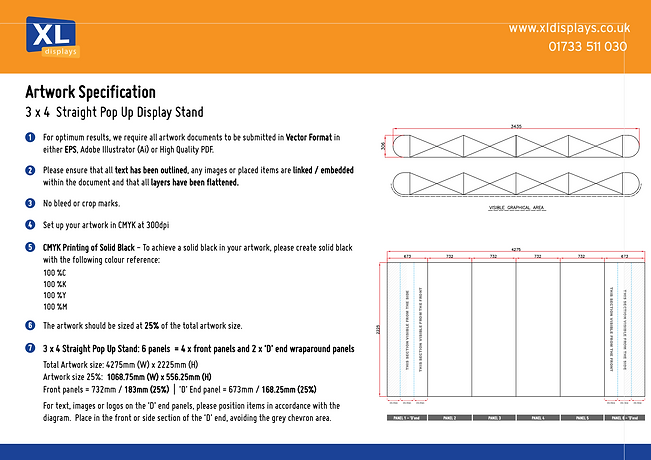
Template from print supplier for providing printed artwork for an exhibition stand.

Printed exhibition stand for the new product launch, shown at a real event.
OmniFit Thermal and Sound Slab Launch Exhibition Stand
Purpose: Printed Exhibition stand to be used to promote the new product launch.
bottom of page